Summary
Telegraf Controller 1.1 lets teams make fleet-wide configuration changes with a single edit using Global Constants, Configuration Groups, and Configuration Aliases. Configuration Versioning makes every change traceable, comparable, and reversible. High availability, available in Telegraf Enterprise, automatically fails over between Controller instances so agents can continue pulling configurations and reporting health if an instance goes down.
Table of Contents
Telegraf is easy to stand up. You just need a config file with a few plugins and data flows. That ease is why Telegraf fleets grow fast, and why managing the agents that collect data becomes more difficult than collecting it. A change that takes minutes on ten agents takes days across a few hundred. Telegraf Controller is a centralized control plane for managing, configuring, and monitoring your fleet of Telegraf agents.
Telegraf Controller 1.1 is available today and addresses that management problem from two sides: keeping the Controller layer itself reliable, and making fleet-wide changes without touching every config. The release adds high availability, configuration versioning, global constants, configuration groups, and aliases.
High availability (Telegraf Enterprise)
High availability lets you run multiple Controller instances from a shared database with automatic failover. If an instance goes down, agents keep pulling configuration and reporting health through the remaining instances.
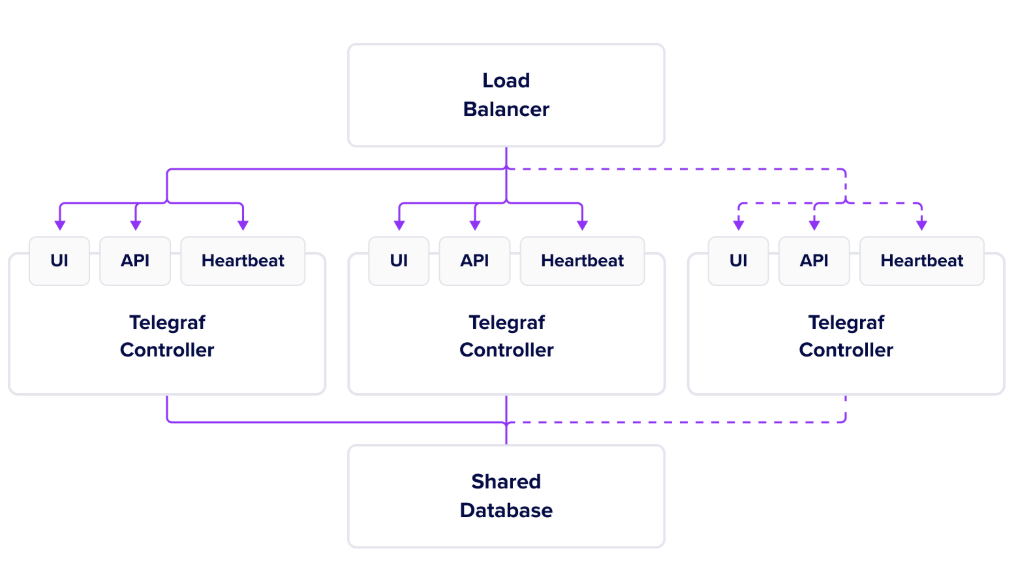
For production monitoring, compliance systems, and other mission-critical pipelines, the configuration layer needs to meet the same reliability requirements as the rest of the stack. High availability also simplifies planned maintenance: one instance can go offline for patching and the config path stays open. In strict environments that require redundancy, it also removes Controller as a single point of failure.
Configuration versioning
Configuration versioning saves every configuration change as a new version, including who made it. If an edit causes errors, compare the current version against the previous one in a side-by-side, color-coded diff and revert.
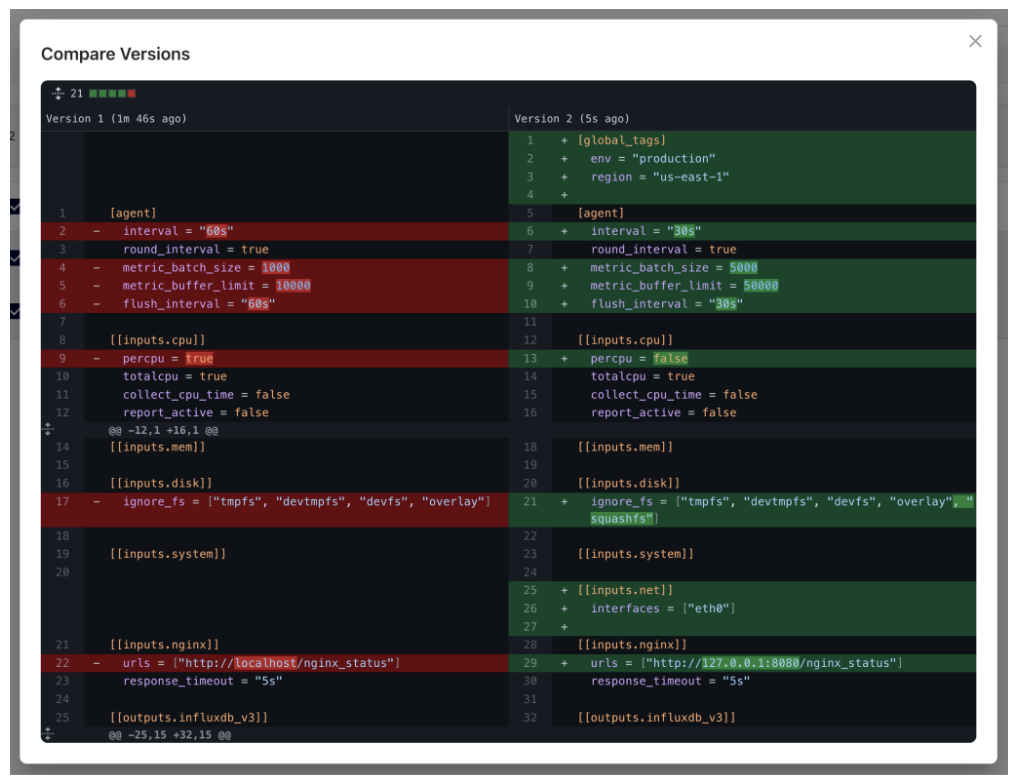
Configuration history also provides an audit trail. Teams can trace when individual settings changed and test tuning changes without losing the last working configuration.
Global constants
Global constants let you define a value once (an output endpoint, a collection interval, a region name) and reference it from any configuration; updating the constant updates every configuration that references it.
Reference a constant anywhere in a configuration with the ::{constant_name} syntax. When Controller serves a configuration to an agent, it resolves each reference to the constant’s current value:
[agent]
  interval = "::{collection_interval}"

[[outputs.influxdb_v3]]
  urls = ["::{influxdb_url}"]
  token = "${INFLUX_TOKEN}"
  database = "::{metrics_database}"
The immediate benefit is consistency: shared values live in one place instead of being duplicated across dozens of configurations and drifting out of sync. Constants also simplify migrations: moving your fleet to a new output endpoint or standardizing collection intervals across teams becomes one edit instead of a config-by-config sweep.
Configuration groups
Configuration groups bundle multiple configurations into an ordered unit that agents retrieve in a single request. Instead of assigning each agent its own stack of individual configs, you assign the group.
Groups compose by reference, not by copy. A config can belong to multiple groups, and editing a config propagates the change to every group that includes it.
That’s what makes groups work as role profiles. Build one base config with the system inputs every host runs, then compose it with the configs specific to a web server or a database host. Tune the base config once and every role updates without maintaining separate copies that can drift. Groups also serve as templates. A group proven in production becomes the starting point for the next site or deployment, instead of another copy-paste job.
Configuration aliases
Configuration aliases let you use custom, human-readable identifiers for configs in both the UI and the API. Agents request web-baseline instead of a UUID, so when it’s time to move agents to a different config, simply move the alias and the fleet cuts over on the next pull.
If you are running multiple Controllers use a single alias to reference the same config on each instance rather than config UUIDs, which are unique to each Controller.
One change, fleet-wide
Constants, groups, and aliases are each useful on their own, but they’re designed to work together. If every site’s agents request the same group by alias, and that group’s configurations pull shared values from global constants, a fleet-wide change—a new endpoint or interval—is a single edit. Every site picks it up on its next config pull.
What’s free and what requires Telegraf Enterprise
| Feature | Free | Enterprise |
|---|---|---|
| High availability | No | Yes |
| Configuration versioning | Yes | Yes |
| Configuration aliases | Yes | Yes |
| Global constants | Yes | Yes |
| Configuration groups | Yes | Yes |
Get started
The value of Telegraf Controller 1.1 is a config path that stays up and is far less work to keep the fleet current. High availability maintains uptime through instance failures, so the layer serving your configs meets the same reliability as the rest of your stack. Shared values are defined once instead of copied across every config, and config changes reach the whole fleet on the next pull with a record of what moved and an easy revert if something went wrong.
Telegraf Controller 1.1 is available today. Download and install Telegraf Controller for free or contact us about Telegraf Enterprise.


